The Crypt World BuddyPress Ordeal – A Troubleshooting Journal
Website: Crypt World
WordPress Version: 6.9.4
Hosting: Hostinger
Theme: Hello Theme (Twenty Twenty-Four tested)
Status:  Pages tab still missing after exhaustive efforts
Day 1 – The Installation
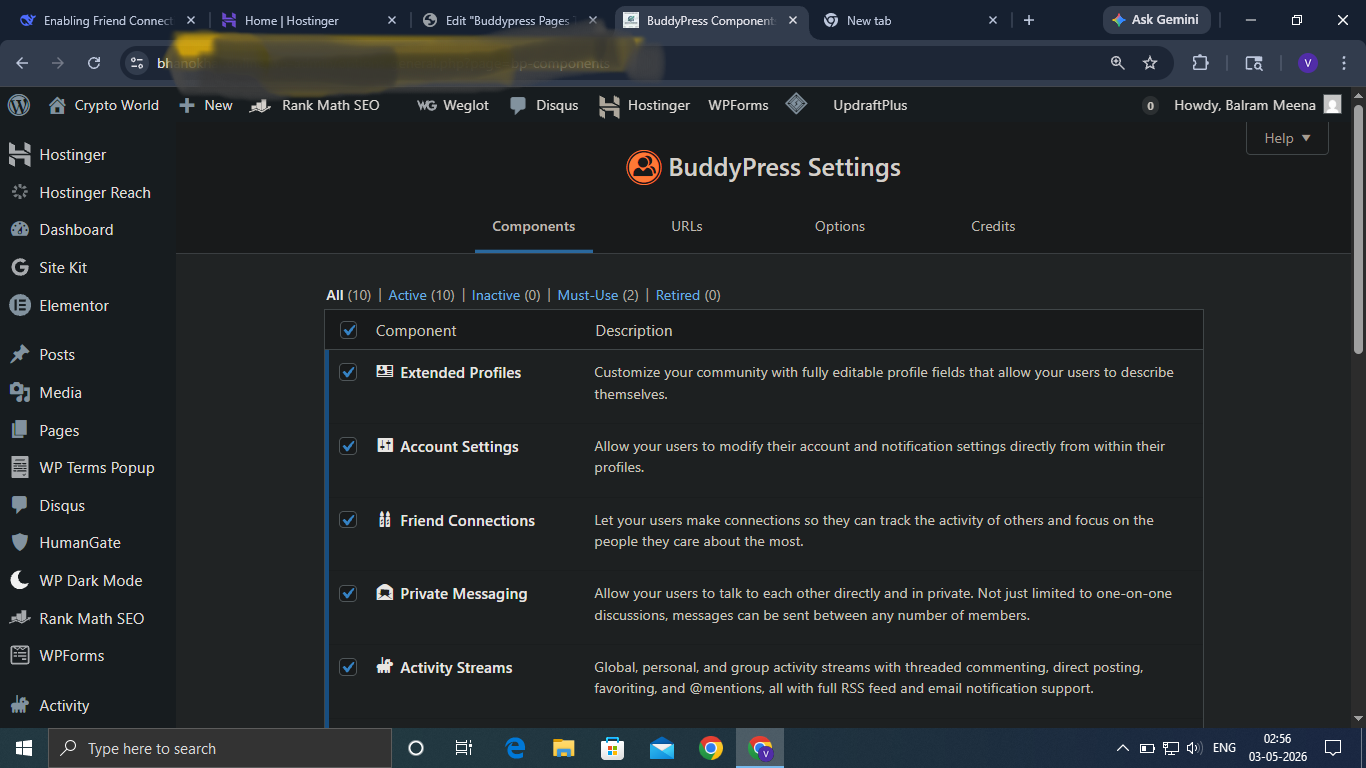
Installed BuddyPress on Crypt World with excitement. Went to Settings → BuddyPress to configure pages. Saw only four tabs: Components, URLs, Options, Credits.
No Pages tab.
Thought it was a simple glitch.
Day 2 – The Basic Fixes (Failed)
Created blank pages (Register, Activate, Activity, Members ) No change
Changed Permalinks to “Post Name” and saved No change
Cleared browser cache (Ctrl+F5) No change
Saved Permalinks repeatedly No change
Day 3 – The Nuclear Option (Failed)
Deactivated all plugins except BuddyPress.
Switched to Twenty Twenty-Four theme.
Switched to Twenty Twenty-Three theme.
Result? Still no Pages tab.
The problem survived a complete plugin wipe and theme change. This should not happen.
Day 4 – Investigating Core WordPress
Reinstalled WordPress core (Dashboard → Updates → Re-install Now).
Result? Nothing.
The Pages tab remained invisible like a ghost.
Day 5 – Database Inspection
Logged into Hostinger → hPanel → phpMyAdmin.
Found `wp_bp_activity` table in the database.
Conclusion: BuddyPress installed correctly. Tables exist. The plugin is not broken.
Day 6 – Current Status
What works:
BuddyPress database tables are present
WordPress core is freshly reinstalled
No plugin conflicts (all others deactivated)
No theme conflicts (default themes tested)
What does not work:
– The Pages tab under Settings → BuddyPress will not appear
What remains untested:
Hostinger server-side cache
Object cache clearing
Manual page assignment via code
The Question for My Audience
I have tried everything:
Reinstalled WordPress core
Deactivated all plugins
Switched to default themes
Verified database tables exist
Flushed permalinks repeatedly
Cleared browser cache
But the “Pages” tab under Settings → BuddyPress still refuses to appear.
Has anyone else faced this? How did you resolve the missing Pages tab in BuddyPress?
Please share your solution in the comments below. I am out of ideas.
Leave a Reply